Showing posts with label Apps. Show all posts
Showing posts with label Apps. Show all posts
Saturday, June 6, 2020
Saturday, May 23, 2020

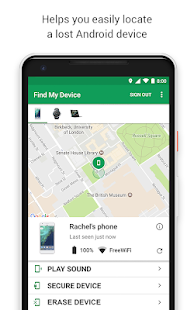 ખોવાયેલ કે ચોરાઈ ગયેલ મોબાઇલ ને તમે આ


Thursday, May 21, 2020
Wednesday, May 20, 2020
વિદ્યાર્થીઓ,વાલીઓ તથા શિક્ષકશ્રીઓ માટે ખુબ જ ઉપયોગી એપ્લીકેશનનો ખજાનો

નીચે વિદ્યાર્થીઓ,વાલીઓ તથા શિક્ષકશ્રીઓ માટે ખુબ જ ઉપયોગી એપ્લીકેશની યાદી આપેલ છે. જે APP ડાઉનલૉડ કરવી હોય તેના પર CLICK કરો.
DIKSHA
OXFORD DICTIONARY
GOOGLE CLASS ROOM
MY STUDENT HOME WORK PLANNER
NASA
HELLO ENGLISH
CAM SCANNER
NCERT
FLIPBORD
LASTPASS
SCIENCE JOURNAL
DIKSHA
OXFORD DICTIONARY
GOOGLE CLASS ROOM
MY STUDENT HOME WORK PLANNER
NASA
HELLO ENGLISH
CAM SCANNER
NCERT
FLIPBORD
LASTPASS
SCIENCE JOURNAL
Sunday, May 10, 2020

Saturday, May 9, 2020
 આ એપ્લિકેશનમાં તમે ટાઈપીંગ વગર પણ સ્પેલિંગ નો અર્થ ગુજરાતી, હિન્દી સહિત 44 ભાષા માં જાણી શકશો. આ APP ડાઉનલોડ કરવા અહીં CLICK કરો.

Saturday, May 2, 2020

Download Mparivahan App for Digital Storage of Vehicle document
Download Mparivahan App for Digital Storage of Vehicle document
From 1st Novembor 2019 Motor vehicle act new rules Implement In gujarat. So everyone have to now wear Helmet and Carry own Vehicle Document In Vehicle In physical Formate. Mparivahan is Official government Applicaion to Store Vehicle Document In Digital Formate. Mprivahan is Valid to Store Vehicle Document s Like RC Book, Driving Licence, Vehicle Insurance, Vehicles PUC and other documents. You Need To Download Mparivahan Application In your Mobile phone And Upload your all Vehicles Document in this application.
"Motorists can produce digital documents. Digital documents do not mean scanned copy or a photo of driving license, RC (registration certificate) or insurance. They have to be stored on DigiLocker or mParivahan app," the official said.

Vehicle Owner Do not need to keep Vehicle Document In Physically With Vehicles. Traffic Police Will Verify your Vehicle Document In Mparivahan application. In this Article We Tell you All Detail About Mparivahan Application Like, How to download Mparivahan Apps, How to Upload Document in mparivahan app, How to use Mparivahan apps. Read this full Article end to end.
"Motorists can produce digital documents. Digital documents do not mean scanned copy or a photo of driving license, RC (registration certificate) or insurance. They have to be stored on DigiLocker or mParivahan app," the official said.
Vehicle Owner Do not need to keep Vehicle Document In Physically With Vehicles. Traffic Police Will Verify your Vehicle Document In Mparivahan application. In this Article We Tell you All Detail About Mparivahan Application Like, How to download Mparivahan Apps, How to Upload Document in mparivahan app, How to use Mparivahan apps. Read this full Article end to end.
How To Download Mparivahan Application :
- First You have to open Google Paly store.
- Then Search with "Mparivahan App"
- In Search Result So many application Show related maprivahan app.
- You have to varify official government Mparivahan App with original Logo.
- Here We Also Upload Original Apps Logo of Maprivahan app.
- then Download thsi Application and Install Mparivahan app In your phone.
- You can Download Mparivahan App Directly from here
How To Use Maprivahan App ::
- After Successfully Install Mparivahan app, You have to Open this app and allow All Permission to use mparivahan app.
- then Create your Account with Phone no. or E mail id.
- then Generate your Password.
- Enter Password very carefully because You have to use this Password for Login in future. so, Remember Your Password.
- Then You see various Option in Mparivahan App.